top of page


adding server to steam
-
Open Steam
-
On the top bar select "View", scroll down a little, and select "Servers". Will open a new window
-
On the top bar, we should be on the "Favorites" option.
-
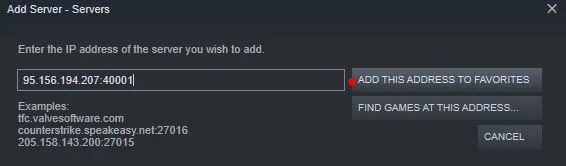
On the bottom right corner select "Add server". Will open a little window requesting an IP

-
Add the server IP 217.114.192.86:21778 and then click
"Add this address to favorites"
-
Now your server will be on the Favorites list, select it (will light up with a blue background)
-
On the right bottom corner select "Refresh". Select again your server and click on "Connect" (If you click on "Connect" without refreshing before, an error will appear. This is a bug from Steam)

-
if above error occurs you may just need to launch ark client and run from
the favorites page within

bottom of page